Short answer: All three are fast CoreXY 3D printers with a 300°C hardened steel nozzle and acceleration of up to 20,000 mm/s². The Creality K2 Pro Combo is the big one: 300 mm in every direction, and the only one of the three for which the maker lists active chamber heating, up to 60°C, which Creality says reduces warping and cracking in materials such as ABS, ASA and PA-CF. The Creality K3 is the multi-material one: four independent nozzles, so up to four colours or materials wait in their own nozzle and the printer switches nozzles instead of reloading filament. The Bambu Lab P2S is the smallest and lightest at 14.9 kg, prints up to 256 mm each way, and grows to up to 20 colours with extra AMS units. Pick the K2 Pro for large parts in tough materials, the K3 for frequent multi-material prints, and the P2S for a compact all-rounder.
Choosing between Creality and Bambu Lab for your next 3D printer? Three machines come up again and again in the questions we get: the Creality K2 Pro Combo, the Creality K3 and the Bambu Lab P2S. Here is what each maker's own support pages say, side by side.
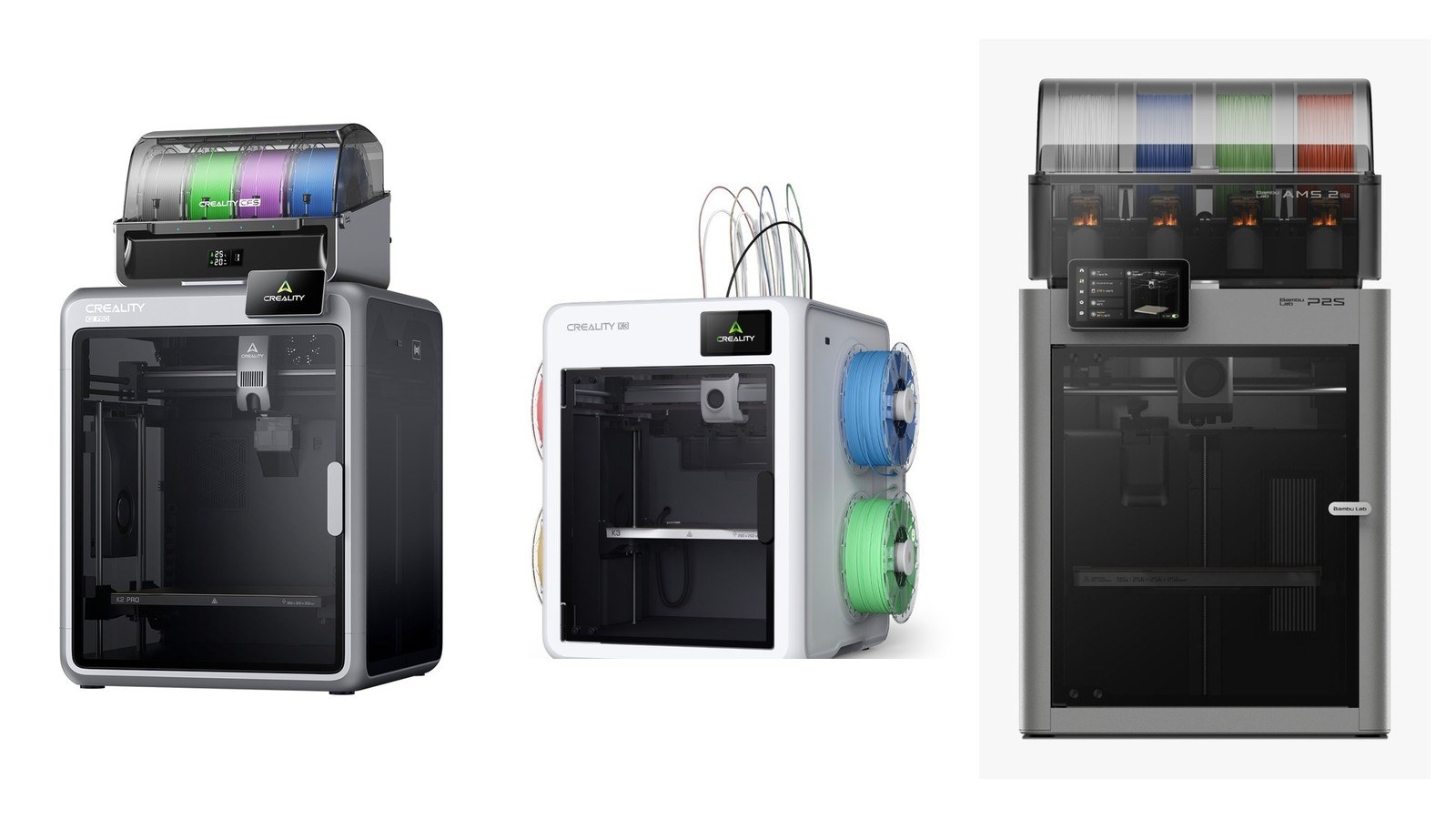
The specs side by side
| Spec | Creality K2 Pro Combo | Creality K3 | Bambu Lab P2S |
|---|---|---|---|
| Build volume | 300 × 300 × 300 mm | 260 × 260 × 260 mm | 256 × 256 × 256 mm |
| Top speed (maker's figure; Bambu Lab's is toolhead movement) | 600 mm/s | 500 mm/s | 600 mm/s (toolhead movement) |
| Acceleration | up to 20,000 mm/s² | up to 20,000 mm/s² | up to 20,000 mm/s² |
| Nozzles | 1, hardened steel | 4 independent, hardened steel | 1, hardened steel |
| Max nozzle temperature | 300°C | 300°C | 300°C |
| Max bed temperature | 110°C | 100°C | 110°C |
| Chamber | Active heating up to 60°C | Open frame; Creality lists the chamber as "Enclosed, active cooling" (no top cover in its packing list) | Closed body, no active chamber heating |
| Multi-colour system | CFS, in the Combo | 4 nozzles; Creality's packing list includes a CFS nano | AMS 2 Pro, in the P2S Combo |
| Air filter | Activated carbon | Foam pre-filter + HEPA 12 + activated carbon | Activated carbon |
| Camera | AI camera: remote view, spaghetti and foreign-object detection, print-quality inspection | AI camera: remote view, spaghetti and foreign-object detection | 1080p 30 fps live camera with spaghetti, foreign-object and nozzle-clumping detection |
| Screen | 4-inch colour touch screen | 3.97-inch LCD | 5-inch colour touch screen |
| Noise (maker's figure) | Not listed by Creality | Not listed by Creality | Below 50 dB in Silent Mode, at 1 m |
| Printer size | 445 × 447 × 573 mm | 420 × 485 × 536 mm | 392 × 406 × 478 mm |
| Net weight | 23.7 kg | 21.9 kg | 14.9 kg |
| Slicer named by the maker | Creality Print | Creality Print, Orca Slicer, Prusa Slicer | Bambu Studio |
Where the Creality K2 Pro Combo wins
- The biggest prints: 300 mm in every direction, against 260 mm on the K3 and 256 mm on the P2S.
- A heated chamber: Creality lists active chamber heating up to 60°C. For the K3 it lists active cooling, and Bambu Lab says the P2S has no active chamber temperature function.
- A warmer chamber for engineering materials: Creality says higher chamber temperatures reduce warping and cracking and improve surface quality with materials such as ABS, ASA, PC and PA-CF. The P2S and the K3 list some of the same filaments; the difference here is the heated chamber, not the list.
“K2 Pro introduces active chamber temperature control, with a maximum chamber temperature of 60°C.” — Creality, K2 Pro Chamber Temperature Setting Guide (read 24 November 2026)
Where the Creality K3 wins
- Four nozzles, one per filament: each colour or material stays in its own nozzle and hot end, so a change is a nozzle swap, not a full unload and reload of filament.
- Less purge waste: Creality says the K3 needs much less flushing than a single nozzle that keeps switching colours, though the real amount depends on the model and the slicing.
- Different materials in one print: each nozzle has its own hot end, so a model and its support material can go in separate nozzles. Creality notes that adhesion between materials and the print and bed temperatures still need checking.
- The most filter stages: a foam pre-filter, a HEPA 12 filter and activated carbon.
“The biggest difference is that the K3 is equipped with 4 independently switchable nozzles.” — Creality, K3 FAQ (read 24 November 2026)
Where the Bambu Lab P2S wins
- Smallest and lightest: 392 × 406 × 478 mm and 14.9 kg, against 21.9 kg for the K3 and 23.7 kg for the K2 Pro.
- Room to grow: Bambu Lab lists up to 4 AMS 2 Pro and 4 AMS HT units, for up to 20 colours. Creality's K2 Series page describes its CFS system as up to 16 colours.
- A long material list: Bambu Lab lists PLA, PETG, ABS, ASA, TPU, PET, PA, PC and PVA, plus carbon and glass filled grades such as PA6-CF, PAHT-CF and PPA-CF.
- Drying in the AMS 2 Pro: Bambu Lab says an AMS 2 Pro connected to the P2S can dry filament while the printer is on standby. The P2S Combo comes with one.
“The P2S does not have an active chamber temperature function, but it can adjust the chamber temperature through a closed chassis and automatic switching between internal and external air circulation.” — Bambu Lab Wiki, P2S FAQ (read 24 November 2026)
The materials each maker lists
- K2 Pro: PLA, PETG, PET, TPU 95A, ABS, ASA, PLA-CF, PA-CF and PPA-CF.
- K3, without the top cover: PLA, PETG, PET, PLA-CF/GF, PETG-CF/GF, TPU 95A and PCTG. With the top cover Creality adds ABS, ASA, ASA-CF, PP, PC, PA, PA-CF and PP-CF/GF.
- P2S: PLA, PETG, ABS, ASA, TPU, PET, PA, PC, PVA, PLA-CF, PETG-CF, ABS-GF, ASA-CF, PA6-CF, PA6-GF, PAHT-CF, PPA-CF and PET-CF.
Which one should you buy?
- Buy the Creality K2 Pro Combo if you print large parts or engineering materials such as ABS, ASA or carbon-fibre nylon and want a heated chamber.
- Buy the Creality K3 if most of your prints mix colours or materials, such as a model with soluble support, with compatible filament and software.
- Buy the Bambu Lab P2S Combo if you want multi-colour prints from a compact, lighter printer, with filament drying in the AMS 2 Pro.
- Buy the Bambu Lab P2S printer only if you print in one colour. Bambu Lab says the printer-only P2S has no filament buffer, so adding an AMS 2 Pro later also needs a buffer bought separately; the P2S Combo has the buffer installed.
Two things to know before you choose. Bambu Lab recommends a room between 10 and 30°C for the P2S, so in an Omani summer print in an air-conditioned room. We did not find an ambient range on the Creality pages we read for the K2 Pro and K3, so check it before you buy. On the K3, Creality lists ABS, ASA, PC and PA-CF only with the top cover fitted, and its packing list shows no top cover. It also says mixing nozzle sizes on the four nozzles is not available yet and is planned through future updates.
More 3D printer guides
- Creality 3D Printers in Oman (2026): Prices and Which One Fits Your Work
- Which 3D printer should a creator buy in Oman? Bambu Lab A1 mini vs A1 vs P2S
Frequently asked questions
Which of the three has a heated chamber?
The K2 Pro is the only one for which the maker lists active chamber heating, up to 60°C. For the K3, Creality lists "Enclosed, Active Cooling", but its packing list shows no top cover and it lists ABS, ASA, PC and PA-CF only with the top cover fitted. Bambu Lab says the P2S has no active chamber temperature function; it manages the chamber through its closed body and by switching between inside and outside air.
Does the K3 print with all four nozzles at the same time?
No. Creality says only the selected nozzle prints while the other three wait. When the model needs another colour or material, the K3 parks the current nozzle and picks up the next one by itself, with no manual pause.
Can the K3 print more than four colours?
In one run it uses up to four filaments, one per nozzle, without changing filament. Creality says a model with more colours needs filament changes during the print plan.
How many colours can the P2S print?
Bambu Lab says the P2S takes up to 4 AMS 2 Pro units and 4 AMS HT units, 8 units with 20 slots, so up to 20 colours. The P2S Combo comes with one AMS 2 Pro; the printer-only P2S comes without it.
Which is best for ABS, ASA or carbon-fibre nylon?
On paper, the K2 Pro, for its heated chamber. Creality says higher chamber temperatures reduce warping and cracking with materials such as ABS, ASA, PC and PA-CF. The P2S lists ABS, ASA, PA6-CF and PPA-CF too. On the K3, Creality lists ABS, ASA and PA-CF only with the top cover fitted.
Which one is the quietest?
Only Bambu Lab publishes a figure here: below 50 dB in Silent Mode, measured at 1 metre, for the P2S. Creality's K2 Pro and K3 pages give no noise figure, so we do not compare them.
Which one needs the least space?
The P2S: 392 × 406 × 478 mm and 14.9 kg. The K3 is 420 × 485 × 536 mm and 21.9 kg, and Creality suggests keeping 460 × 500 × 600 mm free for it. The K2 Pro is 445 × 447 × 573 mm and 23.7 kg.
Can I print soluble supports?
On the K3, Creality says the model and a support material such as BVOH or PVA can go in separate nozzles, with compatible filament systems and software. Bambu Lab lists PVA among the P2S filaments. Creality's K2 Pro parameter list does not include BVOH or PVA, so we do not claim it prints soluble supports.
Sources
- Creality: K2 Pro Combo support, parameters
- Creality Wiki: K2 Pro chamber temperature guide
- Creality: K3 support, parameters
- Creality Wiki: K3 FAQ
- Creality Wiki: K3 packing list
- Bambu Lab Wiki: P2S introduction
- Bambu Lab Wiki: P2S FAQ
- Bambu Lab Wiki: P2S packing list
Last updated: 24 November 2026.