Is your Bambu Lab printer clogging, feeding badly or making noise? Bambu Lab's own wiki names the cause and the part to change. Here is each problem next to the Skyorbits part that fixes it.
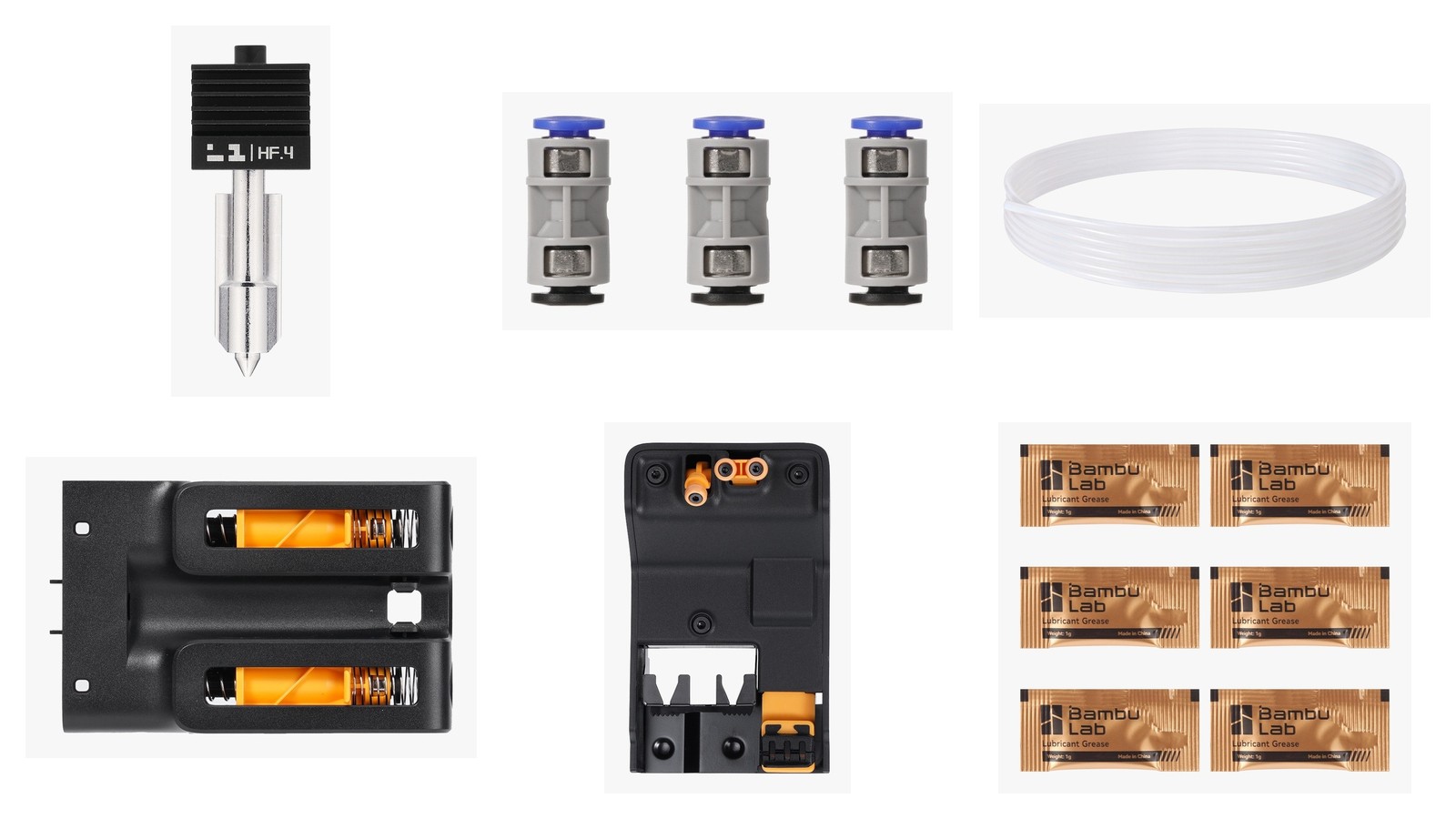
Short answer: Most Bambu Lab printer problems come down to a few wear parts, and Bambu Lab's wiki says which one to change. A clogged or damaged hotend is replaced with a new hotend, and abrasive filament such as carbon-fibre needs a hardened steel nozzle. A worn PTFE tube is a consumable: Bambu Lab says to replace it every 2 months, or every 1 month with abrasive filament. A tube that will not stay fixed points to the PTFE tube connector. A damaged purge wiper is replaced as a unit, the filament buffer sits behind AMS feeding errors, and lead screws that run dry need grease. A stuck print comes off with a scraper, and the AMS 2 Pro dries damp filament. This guide maps 14 problems to the Bambu Lab parts we sell, quotes the exact HMS error text, and flags the traps: TPU 95A HF cannot be auto-fed by any AMS, and some parts fit only the H2 series or only the A1 and A1 mini.
Last updated: 25 October 2026 · Price on each product page · Troubleshooting from Bambu Lab's official wiki
The problems, causes and parts at a glance
| Problem | What Bambu Lab says causes it | Bambu Lab's official fix | Skyorbits part |
|---|---|---|---|
| Clogged nozzle, under-extrusion or no extrusion | Filament that softens early, uneven diameter, debris, particles in the nozzle tip, or old filament not fully purged | Heat and extrude by hand, clear with the pin tool, cold pull; replace the hotend if clogged or damaged | Replacement hotends |
| Nozzle worn by abrasive filament | Hard particles in carbon-fibre, glow-in-the-dark and wood filaments | Use a hardened steel nozzle; stainless steel is for filaments without fibres or particles | Hardened steel hotends |
| Frequent clogs with fibre-filled filament | A 0.4 mm nozzle has a moderate clog risk with fibre-reinforced filament | Use a larger diameter to minimise blockages; the 0.6 mm nozzle is clog-resistant | 0.6 mm and 0.8 mm hotends |
| Feeding failures or filament piling up in the AMS | PTFE tubes wear from repeated loading and unloading | Replace the tube every 2 months, every 1 month with abrasive filament, or when worn | PTFE Tube 4000 mm (FAT003) |
| PTFE tube will not stay fixed, or filament cannot pass the connector | Pneumatic connector damaged, or tube not seated | Fit a new tube or trim the worn end; if it persists, replace the connector | PTFE Tube Connector (FAC063) |
| AMS keeps loading and unloading, or a buffer signal error | Buffer spring or slider stuck, loose 6-pin cable, or a faulty buffer | Free the spring and slider, reseat the 6-pin cable; replace the buffer if damaged or support confirms | Filament Buffers (H2, P2S, X2D) |
| Filament tangle or jam on the spool or in the AMS | Excess feed resistance from a tangled or knotted filament | Untangle it, or cut it and reload; the buffer detects the tangle and pauses the print | Filament Buffers (H2, P2S, X2D) |
| Purge wiper damaged, or filament stuck on it | Wear, a bent metal flap, or filament on the flap | Replace the purge wiper | Purge Wipers (A1, P2S, X2D, H2) |
| Dry or noisy lead screws | Dry contact between moving parts | Clean, then apply a thin layer of grease about every 3 months | Lubricant Grease (FAZ030) |
| Extruder clicking or grinding on the X1C | Bambu Lab lists clicking or grinding and debris on the gears as the reasons to clean and grease | Clean the extruder and put a little grease on the gear teeth | Lubricant Grease (FAZ030) |
| Guide rails dry, noisy or rusting | Rails need regular lubrication to limit wear, noise and rust | Clean and oil the rails; keep oil and grease off the X1 and P1 X-axis carbon rods | Lubricant Oil (FAZ031) |
| Print stuck hard to the plate | The model adheres too firmly | Warm the plate to about 50 °C, put alcohol under the model, lift it with a scraper | Mag-Alloy Scraper (B-SA001) |
| TPU will not feed through the AMS | Soft TPU needs low feed resistance; only TPU for AMS is made for the AMS series | Use TPU for AMS in the AMS; feed every other TPU by hand | TPU for AMS (53100); TPU 95A HF (51200) cannot be auto-fed by any AMS |
| Damp filament: bubbles, stringing, rough surfaces | Absorbed water vaporises inside the nozzle | Dry the filament before printing | AMS 2 Pro |
Bambu Lab nozzle clog fix: when to replace the hotend
Printer moving but nothing coming out, or gaps in the walls? Bambu Lab names two symptoms of a clogged nozzle: under-extrusion (not enough plastic, which leaves gaps around the model) and no extrusion (the printer makes the right moves but no filament comes out).
- Causes Bambu Lab lists: filament that softens inside an enclosure, filament thicker than the regular 1.75 mm, debris on the filament or in the extruder, particles blocking the nozzle tip (common with carbon-fibre, glow-in-the-dark or sparkling filament), and a previous filament that was not purged completely.
- First try: heat the hotend a little above the filament's recommended temperature and extrude by hand. The X1 and P1 page uses 250°C for PLA.
- Then: clear the tip with the pin tool (220°C on the H2S page; skip the pin on a 0.2 mm nozzle) or run a cold pull. Wear gloves: Bambu Lab warns that the pin can release pressure and make the nozzle spit hot debris.
- The numbers: Bambu Lab says these methods tend to clear about 99% of clogs, and that 0.2 mm nozzles are much harder to unclog and may need the steps repeated several times.
- Replace the hotend when the clog stays or the hotend is damaged. Bambu Lab's replacement guides for the A1, P2S and H2D list "hotend clogging" and "hotend damage" as the reasons, and the H2C guide lists a blocked or damaged hotend.
- After a swap: if the new nozzle has a different size, update the nozzle information on the printer screen before printing, as Bambu Lab's A1 and H2D guides say.
- Bambu Lab Hotend with Hardened Steel Nozzle 0.4 mm (A1 mini / A1)
- Bambu Lab High Flow Hotend with Hardened Steel Nozzle 0.4 mm (H2C left hotend / H2S / P2S / H2D / X2D)
- Bambu Lab Hotend with Stainless Steel Nozzle 0.2 mm (H2C left hotend / H2S / P2S / H2D / X2D)
- Bambu Lab High Flow Hotend with Hardened Steel Nozzle 0.6 mm (H2C left hotend / H2S / P2S / H2D / X2D)
- Bambu Lab High Flow Hotend with Hardened Steel Nozzle 0.8 mm (H2C left hotend / H2S / P2S / H2D / X2D)
- Bambu Lab Induction Hotend with Stainless Steel Nozzle 0.2 mm (H2C right hotend)
- Bambu Lab Induction Hotend with Hardened Steel Nozzle 0.4 mm (H2C right hotend)
- Bambu Lab High Flow Induction Hotend with Hardened Steel Nozzle 0.4 mm (H2C right hotend)
- Bambu Lab High Flow Induction Hotend with Hardened Steel Nozzle 0.6 mm (H2C right hotend)
- Bambu Lab High Flow Induction Hotend with Hardened Steel Nozzle 0.8 mm (H2C right hotend)
Which Bambu Lab nozzle for carbon-fibre and glow-in-the-dark filament?
Printing carbon-fibre, glow-in-the-dark or wood filament? Bambu Lab splits its nozzles by material, and the choice decides how long the nozzle lasts.
| Nozzle material | What Bambu Lab says | Filaments Bambu Lab lists |
|---|---|---|
| Hardened steel | Harder than stainless steel, superior wear resistance, best for abrasive filaments with hard particles | PA-CF, PLA-CF, PETG-CF, glow-in-the-dark, wood |
| Stainless steel | High temperature resistance, corrosion resistance, cost-effective, for filaments without fibres or particles | PLA, ABS, ASA, PETG, TPU, PVA |
- The 0.2 mm trap: Bambu Lab says the 0.2 mm nozzle is stainless steel, not hardened steel, so it is not abrasion resistant. Do not print carbon-fibre through it.
- Bigger nozzles clog less: Bambu Lab calls the 0.6 mm nozzle clog-resistant, rates the 0.4 mm nozzle as a moderate clog risk with fibre-reinforced filament, and recommends larger diameters to minimise blockages. It also says nozzles above 0.4 mm clog a lot less because the opening lets larger particles through.
- Read the product name: our hotend listings say "Hardened Steel" or "Stainless Steel" in the title, and "High Flow" or "Induction" where it applies. Induction hotends are the H2C right hotend only.
Bambu Lab PTFE tube worn, or filament piling up in the AMS?
Feeding failing, or filament collecting inside the AMS? Check the PTFE tubes first. Bambu Lab calls them consumables that wear as filament is loaded and unloaded again and again.
“PTFE tubes are considered consumables and should be replaced when worn out to ensure smooth loading and unloading.”
Bambu Lab Wiki, “PTFE Tube Wear in AMS and Maintenance Recommendations”, read 25 October 2026
- Replacement interval: every 2 months with normal use. With abrasive filament such as carbon-fibre or glow-in-the-dark, every 1 month, or whenever clear wear shows. The printer shows a check reminder every 2 months.
- Size: Bambu Lab recommends a tube with a 2.5 mm inner and a 4 mm outer diameter. A different size adds friction (smaller inner diameter) or causes feeding problems (larger).
- If you leave a worn tube: Bambu Lab says it can lead to feeding failures and filament accumulating inside the AMS.
- Cut to length: our tube is 4000 mm and you cut it to size. Bambu Lab lists a different tube length for each printer model and connection, so measure the old tube first.
- Bambu Lab PTFE Tube 4000 mm, Cut-to-Length (FAT003)
Bambu Lab PTFE tube slipping out of the connector (HMS_0700-2000-0002-0006)
Tube popping out, or filament stopping at the connector? That is the connector, not the filament.
- When Bambu Lab says to replace the connector: the PTFE tube cannot be secured (for example it will not stay fixed on the extruder), the filament cannot pass through the connector, or the connector is damaged.
- P2S error HMS_0700-2000-0002-0006: Bambu Lab lists two possible causes, PTFE tube not installed and pneumatic connector damaged. If the connector cannot hold the tube, fit a new tube or trim the worn front section of the old one. If the problem persists, replace the pneumatic connector.
- Fit: our product page lists the P2S, X1C, X1E, P1P, P1S, H2C, H2D Pro, H2S and H2D for this connector. Check it against your printer before you order.
- P2S, at the extruder: the connector on the Hall switch is glued; Bambu Lab recommends replacing the whole Hall switch instead of the connector on its own. FAC063 replaces the push-fit tube connectors elsewhere on the printer, per its product page.
- Bambu Lab PTFE Tube Connector (FAC063)
AMS not feeding filament or keeps loading and unloading
AMS stuck in a load-unload loop? The filament buffer sits between the AMS and the toolhead. It has a slider, a spring and a Hall sensor that tell the printer how the filament is moving.
- Causes Bambu Lab lists (X1 series): poor connection of the 6-pin cable, a stuck buffer slide or spring, or a faulty buffer or AMS main board.
- Fix order: reseat the 6-pin cable and check its pins, check that the spring and slider move smoothly, then check the cables inside the AMS. On the H2 series, Bambu Lab adds one more step: check the 6-pin cable contact at the AMS tail.
- When the buffer itself is replaced: the H2D and H2C guide says when the AMS malfunctions and the buffer is visibly damaged, or after Bambu Lab technical support confirms it. The P2S guide says the same, and the X2D guide lists abnormal loading and unloading caused by buffer failure, or physical damage.
- Tangles: on the P2S, X2D and the H series, Bambu Lab builds filament tangle detection into the buffer. A tangle pushes the slider and the printer pauses with an error. Bambu Lab's own fix for the tangle is to untangle minor knots, or cut the filament, tap continue and reload.
- Three buffers, three printers: SA009 is for the H2D, H2D Pro and H2C, SA015 is for the X2D, and SA011 is for the P2S. Bambu Lab sells a different buffer for the H2S.
- Bambu Lab Filament Buffer for H2D, H2D Pro and H2C (SA009)
- Bambu Lab Filament Buffer for P2S (SA011)
- Bambu Lab Filament Buffer for X2D (SA015)
Bambu Lab purge wiper damaged, or filament stuck on it
Nozzle not wiped clean before a print, or waste filament stuck on the wiper? The purge wiper clears the waste the hotend produces during filament changes, and its metal flap wears or bends over time.
- A1 series, signs to replace: the nozzle is not cleaned well in the pre-print step, filament sticks to the wiper flap, or the wiper is visibly worn or damaged. Bambu Lab's guide needs an H2.0 Allen key and about 5 minutes, and leaves about 3 mm of clearance between the nozzle tip and the wiper.
- A1 excess purge stuck on the plate: before replacing, Bambu Lab says to update the firmware, clean the wiper track, tighten the plate screws and check the X-axis cover position.
- P2S, X2D, H2D and H2C: Bambu Lab's guides say to replace the purge wiper when it is damaged.
- Four different wipers: FAC021 is for the A1 and A1 mini only, FAC162 for the P2S, FAC209 for the X2D, and FAC100 for the H2D, H2D Pro and H2C. Bambu Lab sells another one for the H2S.
- Bambu Lab Purge Wiper for A1 and A1 mini (FAC021)
- Bambu Lab Purge Wiper for P2S (FAC162)
- Bambu Lab Purge Wiper for X2D (FAC209)
- Bambu Lab Purge Wiper for H2D, H2D Pro and H2C (FAC100)
Noisy lead screws, belts and extruder gears: Bambu Lab grease or oil?
Printer getting louder, or a dry squeak from the screws? Bambu Lab splits the two products by job.
- Grease: lubricates lead screws and removes noise between belts and idle pulleys. Oil: for linear guides, slide rails and steel shafts.
- How often: check and lubricate the lead screws about every 3 months, with a thin even layer, and wipe off the excess. Bambu Lab's H2D maintenance table is stricter: clean and grease the Z-axis rods and lead screws every 1 month. Follow the schedule for your model.
- Extruder clicking or grinding (X1C guide): clean the gears, then put a small amount of grease on the teeth of the idler gear and the sides of the drive gear.
- Two traps: never put oil or grease on the X-axis carbon rods of the X1 and P1 series, and on the A1 Bambu Lab recommends oil, not grease, for the Y-axis guide rail, because grease is sticky and attracts dust.
- Bambu Lab Lubricant Grease, All Series (FAZ030)
- Bambu Lab Lubricant Oil, All Series (FAZ031)
How to remove a print stuck on the Bambu Lab plate
Print stuck so hard the plate will not flex? Bambu Lab's plate FAQ lists "Printed Model Adheres Too Firmly and Is Difficult to Remove" and gives the steps.
- Step one: put the plate back on the heated bed and warm it to around 50 °C, then try again. Step two: put alcohol under the model where it meets the plate and lift it gently with a scraper.
- Protect the plate: Bambu Lab says to moisten the contact area with alcohol before using a scraper, which makes removal easier and lowers the risk of scratches. Do not use excessive force.
- Our scraper: the Mag-Alloy Scraper is one piece of aluminium alloy with an extra blade. The blade is sharp, so keep your hands out of the cutting path and keep it away from children.
- Bambu Lab Mag-Alloy Scraper (B-SA001)
TPU and the AMS: which Bambu Lab TPU works?
Soft TPU jamming the feed? Bambu Lab sorts TPU by hardness, and the hardness decides whether the AMS can feed it.
- TPU for AMS: higher hardness and lower feeding requirements, so it can go straight into the AMS series. Bambu Lab's table lists it as compatible with the AMS, AMS lite and AMS 2 Pro.
- TPU 95A HF cannot be auto-fed by any AMS: TPU 95A HF is not compatible with the AMS, AMS lite or AMS 2 Pro; Bambu Lab only allows it in the AMS HT used as a sealed box, fed by hand through its TPU outlet. Its rule is that all TPU except TPU for AMS needs manual feeding.
- Nozzle trap (H2 series page): neither of these two TPUs is supported on the 0.2 mm nozzle or the standard high-flow nozzle, so do not pair them with our 0.2 mm or High Flow hotends.
- Dry it first: Bambu Lab says TPU is highly hygroscopic, so dry it before printing and store it in an airtight container with desiccant.
- Bambu Lab TPU for AMS Filament, White (53100), 1 kg with Reusable Spool
- Bambu Lab TPU 95A HF Filament, Red (51200), 1 kg with Reusable Spool
Wet filament, stringing and bubbles: dry it with the AMS 2 Pro
Bubbles, strings or a rough surface that sanding will not fix? Check the filament for moisture before you blame the nozzle.
“Absorbed water vaporizes inside the nozzle, causing bubbles, stringing, poor flow, or rough surfaces.”
Bambu Lab Wiki, “How to Avoid Nozzle Clogs”, read 25 October 2026
- What it does: the AMS 2 Pro has a built-in drying module. Bambu Lab says it suits filaments that need a drying temperature of 65 °C or less.
- Mixing materials: before drying high-temperature filament such as ABS or PETG, take PLA and TPU out of the AMS, because the drying temperature passes their softening point.
- Drying while printing: the temperature drops automatically after the print starts, to 45 °C for PLA and 55 °C for PETG, to prevent clogging in the AMS.
- Sensitive materials: Bambu Lab says PA, PC, CF and GF engineering filaments are especially sensitive to moisture and prone to warping or clogging when damp.
- Power: an H2 series, P2S or X2D printer can power one AMS 2 Pro for drying. On an X1 or P1 series printer, every unit needs its power adapter.
- Bambu Lab AMS 2 Pro (4-Slot Automatic Material System with Filament Drying)
Bambu Lab HMS error codes and the part behind them
The messages below are copied word for word from Bambu Lab's wiki pages. The same code can read differently on different printers, so the printer column matters.
| HMS code | Printer | Message on Bambu Lab's wiki | Skyorbits part |
|---|---|---|---|
| HMS_0700-2000-0002-0006 | P2S | AMS A has detected a breakage of the PTFE tube during filament loading. Please check whether the PTFE tubes inside and outside the AMS have fallen off or been damaged. | PTFE Tube Connector (FAC063) or PTFE Tube 4000 mm (FAT003) |
| HMS_0700-2000-0002-0006 | X1 series | PTFE tube detached during the feeding process. Please check if the PTFE tube is connected from AMS to extruder. | Re-seat the tubes first; connector (FAC063) or tube (FAT003) only if that fails |
| HMS_0700-4000-0002-0004 | H2 series, P2S | The filament buffer signal is abnormal; the spring may be stuck, or the filament may be tangled. | Filament Buffer, only if damaged |
| HMS_0700-4000-0002-0001 | P2S | AMS A Filament buffer position signal lost: the cable or position sensor may be malfunctioning. | Filament Buffer, only if damaged |
| HMS_0300-1A00-0002-0002 | A1 mini | The extrusion force sensor detects that the nozzle is clogged | Replacement hotend, if cleaning fails |
| HMS_0300-0900-0002-0001 | P2S | The extrusion motor is overloaded. The extruder may be clogged or the filament may be stuck in the tool head. | Replacement hotend, if the nozzle is the clog |
| HMS_0700-7000-0002-0003 | P2S | Failed to extrude the filament. Possible cause: extruder or nozzle clog. | Replacement hotend, if the nozzle is the clog |
| HMS_0C00-0300-0002-000E | H2 series | Your nozzle seems to be covered with jammed or clogged material. | None: clean the nozzle or the camera lens |
| HMS_0300-AB00-0001-0001 | H2C | The right Hotend Heatsink temperature is too high, which may cause a hotend clog. Please open the printer’s top cover and front door to reduce the chamber temperature, or lower the ambient temperature. | None: cool the chamber |
- A code is a pointer, not a diagnosis. Bambu Lab's own pages tell you to check the cheap causes first (cables, a stuck spring, a loose tube) before you change a part.
What these parts will not fix
- First layer not sticking: Bambu Lab lists a wrong plate type selected in the slicer, a plate that was not washed, and a skipped bed leveling calibration. The fix is the right plate setting, hot water and detergent, glue for non-PLA on the smooth PEI plate, and a bed leveling run. None of the parts above changes that.
- Nozzle covered in clumped filament (HMS_0C00-0300-0002-000E): Bambu Lab says the model failed to stick to the plate and stuck to the hotend instead. Clean the clump and fix the adhesion. If there is no clump, Bambu Lab says the alert is most likely a false detection, often from a dirty live view camera: clean the lens with a non-woven cloth sprayed with alcohol, then resume printing.
- H2C right hotend too hot (HMS_0300-AB00-0001-0001): Bambu Lab says to open the top cover and front door to lower the chamber temperature, or lower the room temperature. This is heat, not a failed part.
- Tangled filament: untangling is by hand. The buffer detects a tangle and pauses the print; it does not untie it.
Check before you order: the fit traps
- TPU 95A HF cannot be auto-fed by any AMS. Feed it by hand. The AMS-ready TPU is TPU for AMS.
- H2 series only: Filament Buffer SA009 and Purge Wiper FAC100 (H2D, H2D Pro and H2C), and the Induction hotends (the H2C right hotend). The H2S has its own buffer and wiper.
- A1 and A1 mini only: Purge Wiper FAC021 and the hardened steel hotend 0.4 mm (A1 mini / A1).
- One printer only: Purge Wiper FAC162 and Filament Buffer SA011 for the P2S, Purge Wiper FAC209 and Filament Buffer SA015 for the X2D.
- Grease and oil: both are listed for all Bambu Lab series, but with the X-axis carbon rod and A1 rail exceptions above.
- Not sure which one fits? Send us your printer model and we will tell you.
More Bambu Lab guides from Skyorbits:
- Bambu Lab A1 and AMS lite: real owner questions, answered
- A1 mini, A1 or P2S: which 3D printer should a creator buy in Oman?
Frequently asked questions
How do I fix a clogged Bambu Lab nozzle?
Bambu Lab's order is: heat the hotend a little above the filament's printing temperature and extrude by hand (250°C for PLA on the X1 and P1 pages), then clear the tip with the pin tool (220°C on the H2S page; skip the pin on a 0.2 mm nozzle) or run a cold pull. Bambu Lab says these steps tend to clear about 99% of clogs. If the nozzle is damaged or the clog stays, replace the hotend with one made for your printer.
Which Bambu Lab nozzle should I use for carbon-fibre filament?
A hardened steel nozzle. Bambu Lab lists PA-CF, PLA-CF, PETG-CF, glow-in-the-dark and wood filaments for hardened steel, and says stainless steel is for filaments without fibres or particles, such as PLA, ABS, ASA, PETG, TPU and PVA. The 0.2 mm nozzle is stainless steel and is not abrasion resistant.
How often should I replace the Bambu Lab PTFE tube?
Bambu Lab says every 2 months with normal use, every 1 month with abrasive filament such as carbon-fibre or glow-in-the-dark, and sooner if the tube is clearly worn. The recommended tube has a 2.5 mm inner and a 4 mm outer diameter.
Why will my PTFE tube not stay in the connector?
Bambu Lab lists a damaged pneumatic connector as a cause, and says to replace the connector when the tube cannot be secured or the filament cannot pass through it. Try a new tube, or trim the worn front end of the old one, first. On the P2S, the connector at the extruder (Hall switch) is glued, so Bambu Lab recommends replacing the whole Hall switch instead. Our PTFE Tube Connector (FAC063) replaces the push-fit tube connectors elsewhere on the printer, per its product page.
Is Bambu Lab TPU 95A HF compatible with the AMS?
No, not through the AMS, AMS lite or AMS 2 Pro; feed it by hand (the AMS HT works only as a sealed box with a dedicated TPU outlet). The AMS-ready TPU is the separate TPU for AMS, which Bambu Lab lists as compatible with the AMS series.
Why does my AMS keep loading and unloading filament?
For the X1 series Bambu Lab lists poor 6-pin cable connections, a stuck buffer slider or spring, or a faulty buffer or AMS main board. Reseat the 6-pin cable and free the spring and slider first. Replace the filament buffer only if it is visibly damaged or Bambu Lab support confirms it. Our buffers are for the H2D/H2C, P2S and X2D, not the X1.
Should I use Bambu Lab grease or oil?
Grease is for lead screws and for noise between belts and idle pulleys. Oil is for linear guides, slide rails and steel shafts. Never put either on the X-axis carbon rods of the X1 and P1 series, and Bambu Lab uses oil, not grease, on the A1 Y-axis rail. Check and reapply about every 3 months (A1 Y-axis rail: about once a month; H2D Z rods and lead screws: monthly).
Will these parts fit my printer, and where can I buy them in Oman?
Check the printer names in each product title: some parts fit only the H2 series, only the A1 and A1 mini, only the X2D or only the P2S. Order on the Skyorbits website or app, or send us your printer model by DM or WhatsApp and one of our team will reply. We supply the parts only; for fitting, follow Bambu Lab's own replacement guides linked in the sources.
Order the part you need
Order on the Skyorbits website or in the Skyorbits app. Questions about which part fits? Send us a DM or a WhatsApp message and one of our team will reply.
Sources
Every cause and fix above comes from these Bambu Lab wiki pages, read on 25 October 2026. Skyorbits supplies the parts only; for the replacement steps, follow Bambu Lab's own guides.
- Nozzle/Hotend Unclogging Procedure for X1/P1
- H2S Nozzle/Hotend Unclogging Procedure
- Introduction to Bambu Nozzles
- Hotend Replacement for A1 Series
- Induction Hotend Replacement Guide for H2C
- How to Avoid Nozzle Clogs
- PTFE Tube Wear in AMS and Maintenance Recommendations
- Introduction to Bambu Lab PTFE Tube
- Replacing the pneumatic connector (PTFE Tube Coupler)
- HMS_0700-2000-0002-0006 for the P2S
- HMS_0700-2000-0002-0006 for the X1 series
- HMS_0700-4000-0002-0004 for the H2 series
- HMS_0700-4000-0002-0001 for the P2S
- HMS_0300-1A00-0002-0002 for the A1 mini
- HMS_0300-0900-0002-0001 for the P2S
- HMS_0700-7000-0002-0003 for the P2S
- HMS_0C00-0300-0002-000E for the H2 series
- HMS_0300-AB00-0001-0001 for the H2C
- AMS keeps loading and unloading
- Replace H2D / H2C Filament Buffer and Cable
- Filament Buffer Replacement Guide for the P2S
- Filament buffer Replacement Guide for the X2D
- P2S Air Printing and Filament Tangle Detection
- Bambu 4-in-1 PTFE Adapter
- How to Handle Tangled or Stuck Filament
- Replace the Purge Wiper - A1 Series
- A1 Series Excess Purge Abnormality and Solution
- Purge Wiper Assembly Replacement Guide for the P2S
- Purge Wiper Replacement Guide for the X2D
- Replace H2D/H2C Purge Wiper
- Lubricant Grease and Lubricant Oil
- Guide on how to lubricate the A1 Y-axis guide rail
- H2D Regular cleaning and maintenance recommendations
- Extruder Maintenance Guide: Cleaning and Lubrication - X1/X1C
- Bambu build plates and their FAQs
- Preparation for TPU Printing for H2 Series
- TPU printing guide
- Filament Drying Recommendations
- Filament drying guide for AMS 2 Pro and AMS HT
- Printing with 0.2mm nozzles - Frequently Asked Questions
- Hotend Replacement Guide for the P2S
- Replace H2D Hotend
- First Layer Not Sticking: Causes and Solutions