Short answer: Most Osmo Pocket 4 owners need three things, not ten. First, a wireless mic transmitter: the Pocket 4 links straight to DJI Mic 3, Mic 2 and Mic Mini transmitters, up to two at once, so you can skip the receiver. Second, a fast microSD card: the camera has 107 GB inside and takes cards up to 1 TB, and DJI recommends Lexar Silver Plus. Third, protection: DJI says the Pocket 4 is not water resistant and should be kept away from sand and dust, so a screen protector is worth it. The Creator Combo already includes a DJI Mic 3 transmitter, the wide-angle lens, a mini tripod and the fill light, so check your combo before you buy anything twice. ND filters help in strong sun; mounts and grips depend on how you film. Not sure? Ask us on WhatsApp.
How many accessories do you actually need? Fewer than you think. The Osmo Pocket 4 already has three microphones, 107 GB of storage and a handle with a tripod thread in the box. Here is what is worth adding, mostly from what DJI's own pages say, and we link only accessories we sell.
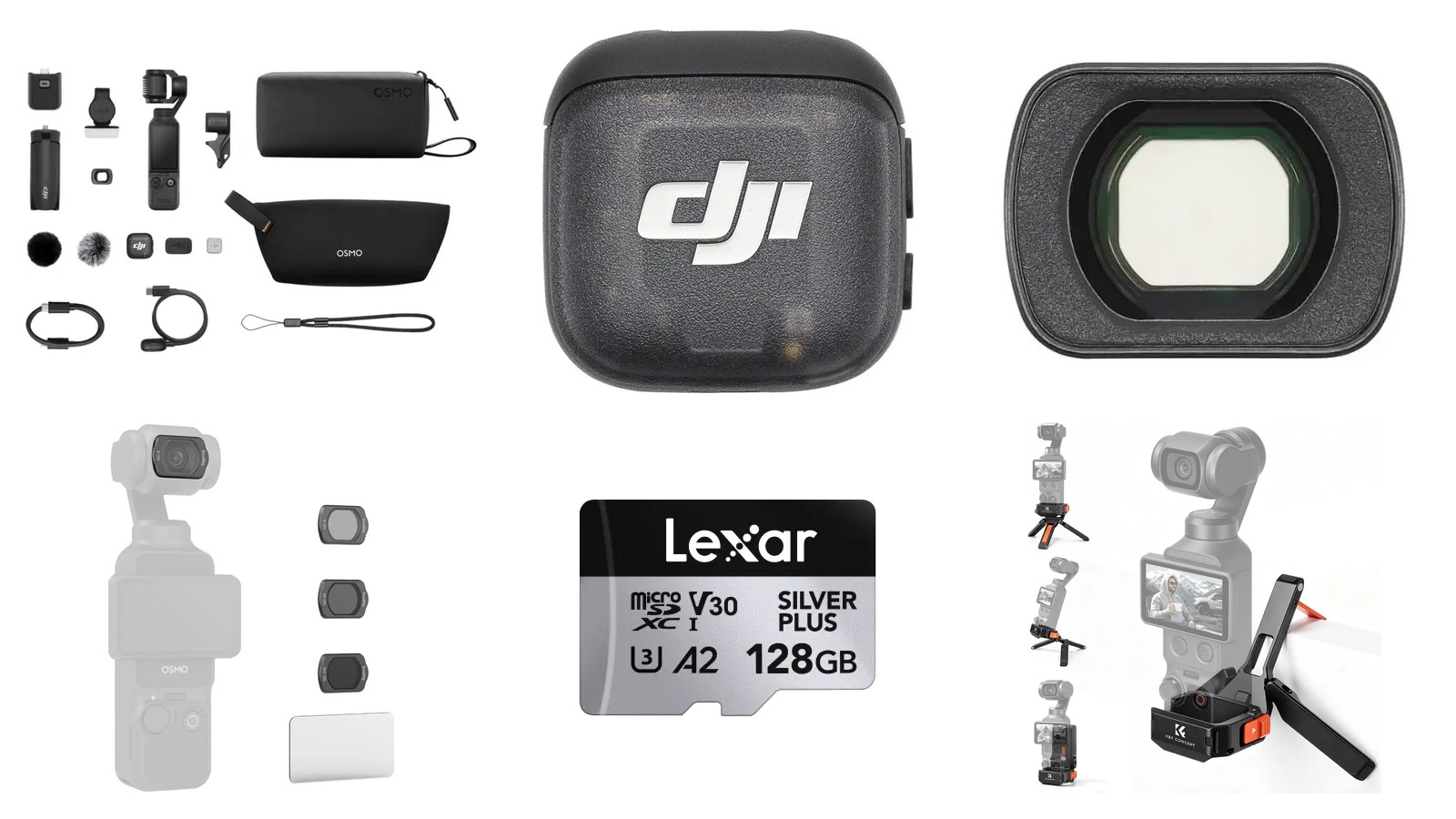
First, check what your combo already has
Different combos include different accessories. This is what comes in the two Osmo Pocket 4 combos we sell.
| Accessory | Standard Combo | Creator Combo |
|---|---|---|
| Gimbal Clamp | Included | Included |
| Handle with 1/4″ thread | Included | Included |
| Carrying pouch, wrist strap, USB-C PD cable | Included | Included |
| DJI Mic 3 transmitter | Not included | Included |
| Osmo Pocket 3 Wide-Angle Lens | Not included | Included |
| Osmo Pocket 4 Fill Light | Not included | Included |
| Osmo Mini Tripod | Not included | Included |
| Carrying bag | Not included | Included |
The gimbal clamp, handle, fill light, mini tripod and lens rows are from the DJI user manual; the other rows are from our product page, read 24 November 2026. Check the box when it arrives.
Sound: the upgrade most people notice first
The Pocket 4 has three built-in microphones, one on each side that is not the screen. They are fine close up. For talking to camera at a distance, or in wind and traffic, a clip-on transmitter on your shirt usually makes the bigger difference (the camera's Pro mode also has Wind Noise Reduction and Directional Audio). The Pocket 4 links to DJI Mic 3, Mic 2 and Mic Mini transmitters directly, up to two at once, so the transmitter alone is enough.
- DJI Mic 3 Clip-On Transmitter: one transmitter for one speaker. Skip it if you have the Creator Combo, which already includes one.
- DJI Mic 3 2-Person kit: two transmitters, a receiver and a charging case, for interviews or if you also film on a phone or a camera.
- DJI Mic Mini 2: DJI says its transmitter connects to the Pocket 4 directly, up to two.
With a mic connected, turn on Built-in Mic Audio Backup and the camera keeps its own sound as a separate file or a second audio track. DJI says it is not available in Slow Motion, Timelapse, Hyperlapse, Webcam or DisplayPort modes.
Storage: one fast microSD card
DJI says the 107 GB inside holds about 220 minutes of 4K/60fps video at the standard bitrate, so a card helps on long days. The Pocket 4 takes microSD cards up to 1 TB, and DJI recommends U3 A2 V30 microSDXC cards such as Lexar Silver Plus, from 64 GB to 1 TB. A card also lets you pull the footage out and put it in your computer; a USB-C cable works too.
Power: what DJI measured, and a desk dock
DJI rates the battery at 240 minutes, measured at 1080p 24fps with Wi-Fi off and the screen off, so real use is shorter. It charges to 80% in 18 minutes and to 100% in 32 minutes with the DJI 65W Portable Charger, sold separately. You can film while it is plugged in, though DJI recommends charging fully first; it charges the battery only after recording stops.
Wider shots and filters
The lens is fixed, so the Wide-Angle Lens is how you get more in the frame. It is in the Creator Combo; Standard Combo owners can add it. DJI's manual says it is not suitable for panoramas, that you should keep the camera lens and both sides of the wide-angle lens clean, because dust or sand may scratch the lens and make the wide-angle lens fall off, and that you should take it off before you store the camera.
DJI lists a Magnetic ND Filter Set and a Black Mist Filter among the Pocket 4 accessories. ND filters cut the light in strong sun, which matters on an Oman beach or in the wadis at midday. The sets we sell are made by SmallRig and K&F for the Pocket 3 and 4, not by DJI:
- SmallRig ND Filter Set for DJI Osmo Pocket 3 & Pocket 4.
- K&F Concept Nano-X Black Diffusion 1/4 + ND2-32 filter, for a softer look plus ND in one.
Holding and mounting
Both combos include the Handle with 1/4″ thread. DJI says it adds a tripod hole, moves the USB-C port to the back so you can record while charging, and makes the handle longer. That covers most tripods already. Add a grip or mount only for a setup you will really use, and DJI warns against mounting the Pocket 4 where it shakes hard, such as on a motorcycle or bike handlebar.
- K&F Magnetic Grip Tripod Adapter for DJI Osmo Pocket 3 & 4.
- SmallRig Mount Support 6003, made for the Osmo Pocket 4P, 4 and 3.
Protection: sand, heat and water
This is the part people skip. DJI says the Pocket 4 is not water resistant, the microSD slot cover is not waterproof, and the camera should be kept away from sand and dust. It stops shooting when it overheats, so do not cover the vents. In a pocket or a small bag the axis lock is enough, and DJI's manual says to attach the Gimbal Clamp after you power off; keep hard objects from pressing on it. In a backpack, DJI says to use the Protective Cover.
Nice to have, not a must
“Osmo Pocket 3 accessories can be used on Osmo Pocket 4.” — DJI, Osmo Pocket 4 FAQ (read 24 November 2026)
So what should you buy?
- Standard Combo: a mic transmitter, a microSD card and a screen protector. Add ND filters if you film outdoors a lot.
- Creator Combo: a microSD card and a screen protector. The mic, the wide-angle lens and the mini tripod are already in the box.
- Still choosing your Pocket 4? Compare the Standard Combo and the Creator Combo on the product page.
More Osmo Pocket guides
- How to Use Your DJI Osmo Pocket 3 & 4: The Complete Guide (2026)
- The SmallRig Creator Rig for DJI Osmo Pocket 3 & 4
- Best Tripod or Gimbal for Vlogging in Oman — Phone & Camera (2026 Guide)
- DJI Osmo Pocket 4 vs Pocket 3: Which Pocket Camera Wins?
Frequently asked questions
Do Osmo Pocket 3 accessories fit the Osmo Pocket 4?
DJI says Osmo Pocket 3 accessories can be used on the Osmo Pocket 4. It does not work the other way for the new Pocket 4 parts: the Fill Light and the Gimbal Clamp do not fit the Pocket 3. The two Battery Handles charge either camera, but DJI recommends the matching handle.
Do I need the DJI Mic receiver with the Osmo Pocket 4?
Not with DJI Mic 3, Mic 2 or Mic Mini transmitters: the Pocket 4 links to them directly, up to two at a time. DJI also lists the DJI Mic Mini 2 transmitter as connecting directly, up to two. Only the original DJI Mic needs its receiver plugged into the camera.
Which microSD card works in the Osmo Pocket 4?
The Pocket 4 takes microSD cards up to 1 TB, on top of its 107 GB of built-in storage. DJI recommends Lexar Silver Plus and Kingston CANVAS Go! Plus U3 A2 V30 microSDXC cards, from 64 GB to 1 TB.
Is the Osmo Pocket 4 waterproof?
No. DJI says the camera is not water resistant, the microSD card slot cover is not waterproof, and the camera should be kept away from sand and dust. Clean it only with a soft dry cloth.
Can I change the lens on the Osmo Pocket 4?
No, the lens is fixed. For wider shots DJI lists a Wide-Angle Lens as a supported accessory; the Creator Combo already includes the Osmo Pocket 3 Wide-Angle Lens. DJI says it is not suitable for panoramas.
How fast does the Osmo Pocket 4 charge?
DJI says 80% in 18 minutes and 100% in 32 minutes, tested with the DJI 65W Portable Charger, which is sold separately. You can film while it is plugged in, though DJI recommends charging fully first; it only charges the battery once recording stops.
Can I use a wired microphone with the Osmo Pocket 4?
Yes. DJI says you can connect a third-party microphone through USB-C digital audio or a 3.5 mm port adapter. With any mic connected, the Built-in Mic Audio Backup option can keep the camera's own sound as a backup.
Where can I buy Osmo Pocket 4 accessories in Oman?
At Skyorbits in Muscat: order on skyorbits.tech or in the Skyorbits app. Not sure which ones you need? Tell us on WhatsApp which combo you have and what you film.
Sources
- DJI: Osmo Pocket 4 FAQ
- DJI: Osmo Pocket 4 specs
- DJI: Osmo Pocket 4 User Manual v1.2
- DJI: DJI Mic Mini 2 FAQ
Last updated: 24 November 2026.