Short answer: Read the code on your old cartridge first, not just the printer's name. Every Canon ink has a model number: PG-445 (black) and CL-446 (colour) for FINE cartridges, PGI-470 or CLI-471 for ink tanks, GI-41 or GI-490 for G-series ink bottles, and a number such as 046 for laser toner. Canon lists more than one code set for the same printer series, and one of its pages notes that some ink model numbers may not be available in your country or region, so the printer name alone is not enough. Then check the code against Canon's own manual for your printer series: the TS3600 series (which includes the PIXMA TS3640) lists PG-445 and CL-446 among its sets, the G3020 series (which includes the G3420) lists GI-41 bottles, and the i-SENSYS MF735Cx takes Canon Cartridge 046 toner (or the higher-yield 046 H). XL and standard cartridges can be used together where the manual says so. Not sure? Send us a photo of the old cartridge on WhatsApp.
Bought ink and it did not fit? It happens a lot, because many Canon cartridges look alike and the printer name on the box is not the code you need. Every code and printer series below is from Canon's own online manuals.
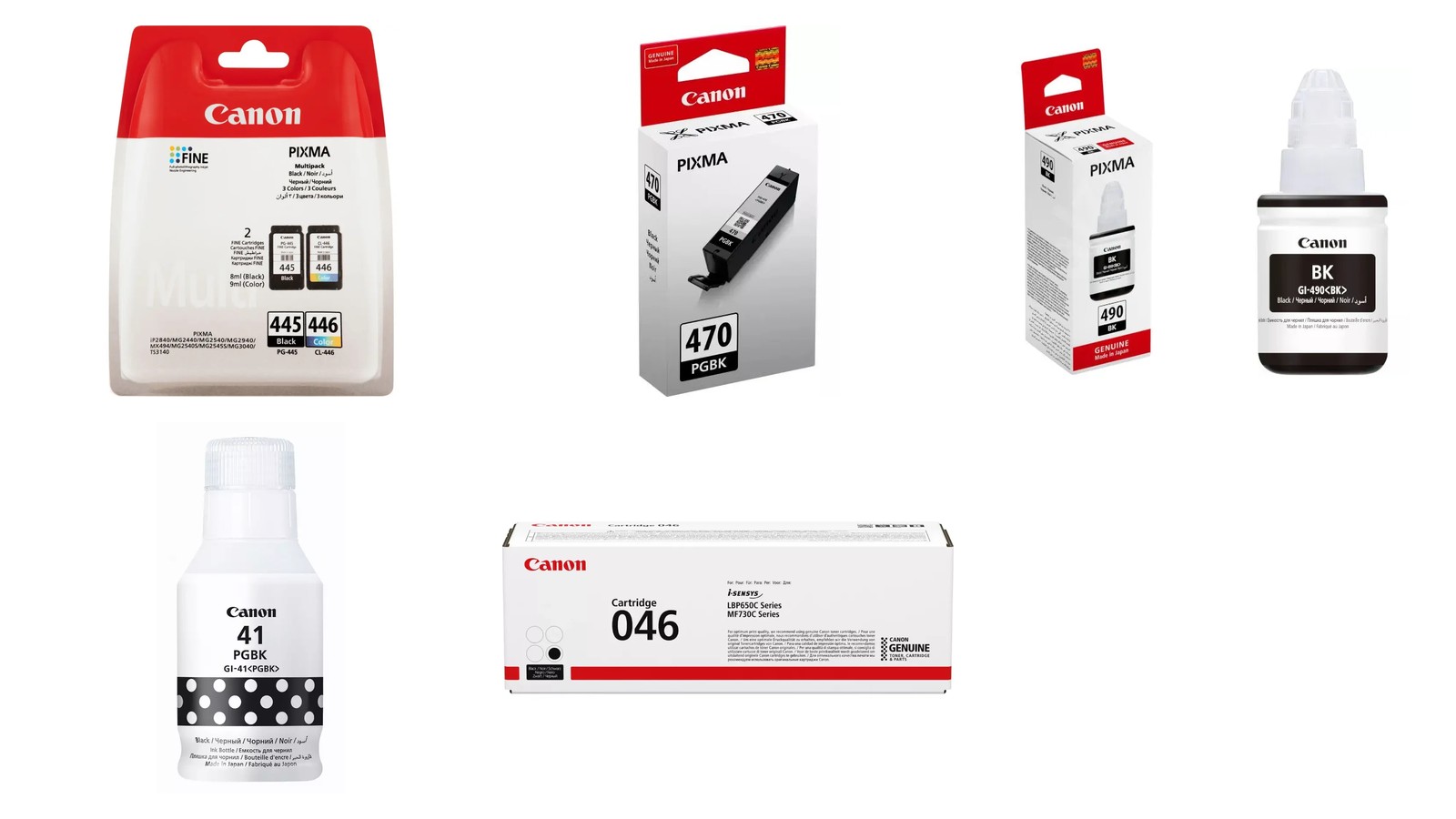
Step 1: find your printer's model name
- Look on the printer itself: the name reads like PIXMA TS3640, PIXMA G3420 or i-SENSYS MF735Cx.
- Canon groups manuals by series: the TS3640 sits in the TS3600 series manual, the G3420 in the G3020 series, the G3410 in the G3010 series and the G3480 in the G3080 series.
- On a Windows computer, for inkjet printers such as the G3030 series: the Canon IJ Status Monitor in Canon's printer driver has an Ink Model Number item that shows the correct ink for your printer.
Step 2: read the code on the old cartridge
- Keep the empty one until the new one is in: it carries the exact code your printer accepts.
- PG and CL: FINE cartridges with the print head built in, one black (PG) and one colour (CL), for example PG-445 and CL-446.
- PGI and CLI: separate ink tanks, for example PGI-470 PGBK with CLI-471 BK, C, M and Y (one tank per colour), or PGI-35 black with CLI-36 colour (one tri-colour tank).
- GI: ink bottles for G-series printers, for example GI-41 or GI-490.
- A toner number: laser printers take a toner cartridge with its own number, for example Canon Cartridge 046 for the i-SENSYS MF735Cx.
- XL: the larger size of the same code. Canon's TS3600 series page lists XL as Large next to the Standard size.
“Remember to double-check your FINE cartridge number when purchasing them.” — Canon, TS3600 series manual, Ink Model Number (read 24 November 2026)
Why the printer name alone is not enough
Canon's ink page for one printer series can list several code sets. For the TS3600 series it shows PG-145, PG-245, BC-345, PG-445 and PG-845 sets, and one of those pages adds that some ink model numbers may not be available in your country or region. Canon does not say on that page which set your printer uses, so match the number on your old cartridge, not the name.
Canon ink codes and the printers they fit
Canon's page for each series usually lists more than one code set: for example the TS3600 series also lists PG-145, PG-245, BC-345 and PG-845, the G3010 series GI-190, GI-290, GI-390 and GI-890, and the G3080 series GI-11, GI-21 and GI-31. The table shows only the sets that match the Canon codes we list below. If your old cartridge shows a different number, that set is not in this table.
| Canon ink code | Printer series in Canon's manual (examples) |
|---|---|
| PG-445 black + CL-446 colour | TS3100, TS3400, TS3600 (incl. TS3640), MG3000 |
| PG-440 black + CL-441 colour | MG3500, MG3600 |
| PG-460 black + CL-461 colour | TS5300 |
| PGI-470 PGBK + CLI-471 BK, C, M, Y | TS5000 |
| PGI-450 PGBK + CLI-451 BK, C, M, Y | iX6800 |
| PGI-35 black + CLI-36 colour | TR150 |
| GI-490 bottles BK, C, M, Y | G3010 (incl. G3410) |
| GI-41 bottles PGBK, C, M, Y | G3020 (incl. G3420), G3080 (incl. G3480) |
| Toner Cartridge 046 and 046 H black, yellow, magenta, cyan | i-SENSYS MF735Cx, MF734Cdw, MF732Cdw |
Genuine Canon ink and toner at Skyorbits
PG-445 and CL-446 FINE cartridges
PG-440, CL-441 and PG-460 FINE cartridges
PGI-470 and CLI-471 ink tanks
- Canon PGI-470 PGBK pigment black
- Canon CLI-471 BK black
- Canon CLI-471 C cyan
- Canon CLI-471 M magenta
- Canon CLI-471 Y yellow
PGI-450, CLI-451 and CLI-36 ink tanks
GI-490 ink bottles
GI-41 ink bottles
- Canon GI-41 PGBK black
- Canon GI-41 C cyan
- Canon GI magenta bottle (choose the 41M option)
- Canon GI-41 Y yellow
Laser toner
Send us a photo of your old cartridge on WhatsApp
Before you fit the new one
- Use a new cartridge: Canon warns that installing a used FINE cartridge may clog the nozzles.
- Do not touch the contacts or the nozzles on a FINE cartridge; the printer may not print properly if you do.
- Right slot for each: on the TS3600 series the colour cartridge goes in the left slot and the black in the right slot. Align the print head after replacing.
- Toner 046: shake the new cartridge 5 or 6 times, do not touch the drum underneath, and put it in the slot with its colour label. A quick adjustment starts when you close the front cover.
Related guides
Frequently asked questions
Which ink does the Canon PIXMA TS3640 use?
The TS3640 is covered by Canon's TS3600 series manual. In the code set with the 445 numbers, Canon lists the PG-445 black and CL-446 colour FINE cartridges, plus the larger PG-445XL and CL-446XL. Check that your old cartridge carries the same numbers before you buy. Canon's TS3600 page also lists PG-145, PG-245, BC-345 and PG-845 sets, so check the number on your old cartridge.
Can I use an XL cartridge with a standard one?
Yes, on the printers whose manual says so. Canon's TS3600 series ink page states that FINE cartridges of different volumes can be used together, so an XL black next to a standard colour cartridge is fine.
Why do Canon's pages list several cartridge numbers for one printer series?
Canon lists more than one code set for the same printer series. The TS3600 series page alone shows five, from PG-145 to PG-845, and does not say which one your printer uses. One of those pages adds that some ink model numbers may not be available in your country or region. That is why the number on your old cartridge matters more than the printer name.
Which ink bottles does the Canon PIXMA G3420 or G3480 take?
In the code set with the 41 numbers, Canon's G3020 series manual (G3420) and G3080 series manual (G3480) list GI-41 bottles: PGBK black, C cyan, M magenta and Y yellow. The G3080 series page also lists GI-11, GI-21 and GI-31 sets, so check the number on your old bottle.
Which ink does the Canon PIXMA G3410 take?
The G3410 is in Canon's G3010 series manual, which lists GI-490 bottles in black, cyan, magenta and yellow in the code set with the 490 numbers. The same manual also lists GI-190, GI-290, GI-390 and GI-890 sets, so check the number on your old bottle.
Which toner does the Canon i-SENSYS MF735Cx take?
Canon's MF735Cx, MF734Cdw and MF732Cdw manual lists Canon Cartridge 046 in black, yellow, magenta and cyan, and also the higher-yield Cartridge 046 H. Canon gives an average yield of 2,200 sheets for the 046 black and 2,300 sheets for each 046 colour, and 6,300 and 5,000 sheets for the 046 H. Check whether your old cartridge says 046 or 046 H.
How do I find my inkjet printer's ink number from my computer?
On Windows, for the G3030 series, Canon's printer driver includes the Canon IJ Status Monitor. Canon's manual says its Ink Model Number item lets you look up the correct ink model number for your printer.
Where can I buy genuine Canon ink in Oman?
At Skyorbits in Muscat: order on skyorbits.tech or in the Skyorbits app. Not sure which one fits? Send a photo of your old cartridge on WhatsApp and we will match the code for you.
Sources
- Canon TS3600 series manual: Ink Model Number
- Canon TS3600 series manual: Ink Model Number, other code set
- Canon TS3600 series manual: Replacing a FINE Cartridge
- Canon TS3100 series manual: Ink Model Number
- Canon TS3400 series manual: Ink Model Number
- Canon MG3000 series manual: Ink Model Number
- Canon MG3500 series manual: Ink Model Number
- Canon MG3600 series manual: Ink Model Number
- Canon TS5300 series manual: Ink Model Number
- Canon TS5000 series manual: Ink Model Number
- Canon iX6800 series manual: Ink Model Number
- Canon TR150 series manual: Ink Model Number
- Canon G3010 series manual: Ink Model Number
- Canon G3020 series manual: Ink Model Number
- Canon G3080 series manual: Ink Model Number
- Canon G3010 series manual: Ink Model Number, other code set
- Canon G3080 series manual: Ink Model Number, other code set
- Canon G3030 series manual: Canon IJ Status Monitor
- Canon i-SENSYS MF735Cx / MF734Cdw / MF732Cdw manual: Consumables
- Canon i-SENSYS MF735Cx manual: Replacing the Toner Cartridge
Last updated: 24 November 2026. Ink codes and printer series are from Canon's online manuals.