Short answer: Yes, a laptop can run a second screen from one USB-C port, and some laptops can run two, but two things decide how many screens you really get. First, the port must carry video: ASUS lists DisplayPort Alt Mode on the USB-C ports of the ZenScreen MB16AHVE, and Apple lists DisplayPort output over USB-C on the MacBook Air with M1. Second, the laptop sets the limit, not the hub. Apple says a supported hub or daisy-chaining does not increase the maximum number of displays you can connect. The MacBook Air with M1 supports one external display, and the M4 and M5 models support up to two. For a screen you carry, the ZenScreen MB16AHVE is a 15.6-inch Full HD portable monitor of 0.9 kg. For a desk, pick a hub by the number of HDMI ports you need, and a monitor arm if your screen has VESA holes.
Working on a laptop and running out of room on one screen? A second screen helps with spreadsheets, editing and video calls. Before you buy a hub or a monitor, check what your laptop can drive. Here is what Apple and ASUS say on their own pages, and which of the items we sell fit each setup.
First check: does your USB-C port carry video?
Not every USB-C port shows a picture. A port that only charges and moves files will not light up a screen through any hub. Look for DisplayPort, DisplayPort Alt Mode, Thunderbolt or USB4 next to the port on your laptop maker's spec page. On the MacBook Air with M1, Apple lists DisplayPort on its Thunderbolt / USB 4 ports.
On a Mac, a hub does not raise the screen limit
Apple says the number of external displays depends on your Mac model and on the resolution and refresh rate of each display. A hub with three HDMI ports still gives a Mac only as many screens as Apple lists for that model.
| MacBook Air | External displays, per Apple |
|---|---|
| MacBook Air with M1 | One, up to 6K at 60Hz |
| MacBook Air with M4 | Up to two, with the built-in screen still on |
| MacBook Air with M5 | Up to two, with the built-in screen still on |
| Any other Mac | See Display Support or Video Support in your Mac's Specifications |
On the MacBook Air with M4 or M5, Apple adds that closing the lid does not increase the number of external displays.
“Using a supported hub or daisy-chaining displays can enable up to 2 displays over a single Thunderbolt port, but does not increase the maximum number of displays that you can connect.” — Apple Support, How many displays can be connected to MacBook Air (read 24 November 2026)
On Windows, check your laptop maker's page
On a Windows laptop the number of external screens also depends on the laptop itself. Before you buy a hub with two or three HDMI ports, look up how many external displays your laptop maker lists for your exact model. Not sure? Send us the model on WhatsApp and we will check it with you.
Hubs we sell, by number of HDMI screens
- Genuine GN-DC42H: two HDMI outputs from one USB-C port.
- Genuine GN-DC44J: two HDMI outputs, a USB-A 3.0 port and USB-C charging pass-through.
- Powerology 13-in-1: two HDMI ports and a DisplayPort, plus Ethernet, card slots and USB ports.
- Genuine GN-DC48G: three HDMI outputs and three USB-A 3.0 ports, with USB-C charging pass-through.
More HDMI ports on the hub do not mean more screens than your laptop supports. Match the hub to the number your laptop maker lists.
Apple says a supported hub can enable up to two displays over one port. We cannot confirm from a maker page how each of these hubs behaves on a Mac, so if you have a Mac, send us your Mac model on WhatsApp before you buy.
A portable monitor for your laptop bag
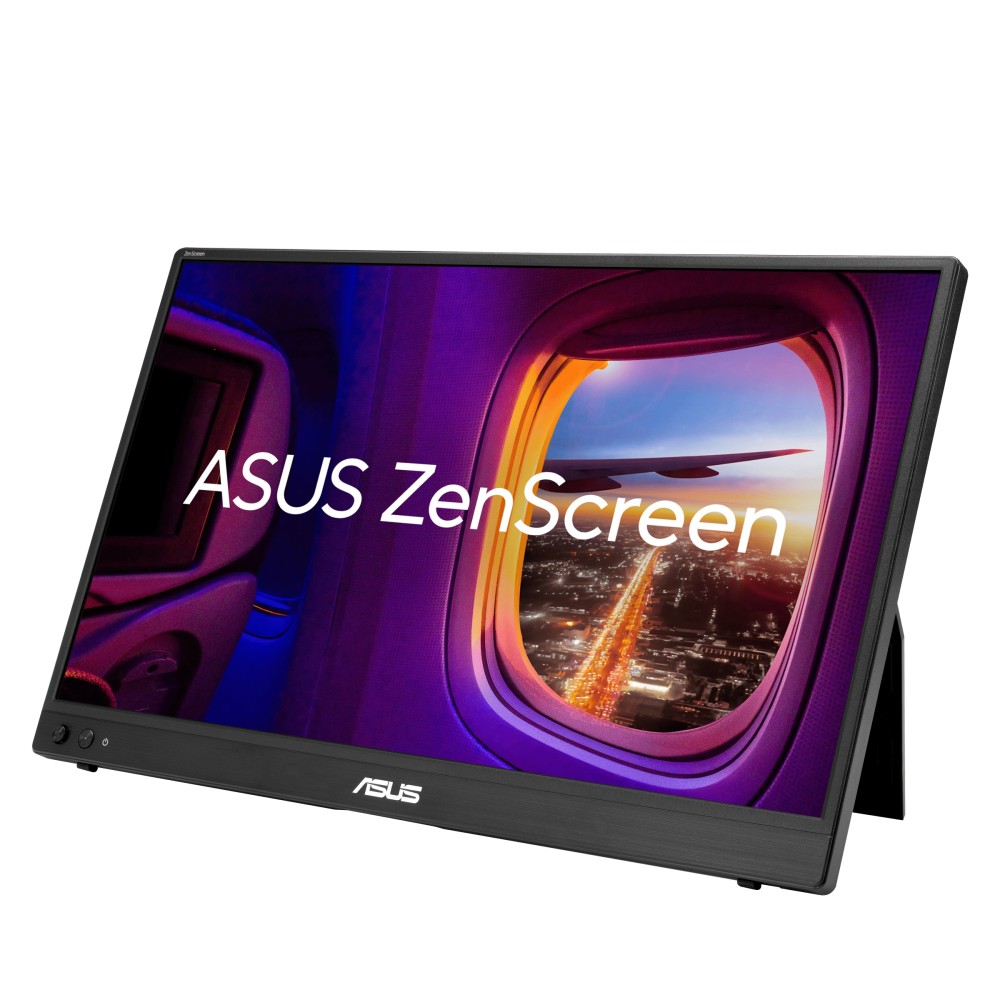
If you work in different places, a portable monitor gives you a second screen without a desk setup. The ASUS ZenScreen MB16AHVE connects over USB-C or mini HDMI and stands on its own kickstand. With HDMI, plug a USB-C cable in for power too.
| Spec | ASUS ZenScreen MB16AHVE |
|---|---|
| Screen | 15.6-inch IPS, 1920 x 1080 |
| Refresh rate | up to 60Hz |
| Brightness | 250 cd/m² (typical) |
| Ports | 2 x USB-C (DisplayPort Alt Mode), 1 x mini HDMI |
| Power pass-through | up to 65W, with a charger plugged into the screen |
| Weight | 0.9 kg |
| Stand | ASUS lists a tilt of 15 to 35 degrees, no height adjustment |
| Tripod socket | 1/4-inch |
| Speakers | none |
Mounting a monitor: VESA arms and stands
VESA is the pattern of four screw holes on the back of a monitor. The arm and the stand below take 75 x 75 mm or 100 x 100 mm. If the back of your monitor has no VESA holes, send us the model before you buy.
- Skill Tech SHW1014H gas spring arm: for screens from 17 to 32 inches, VESA 75 x 75 or 100 x 100, up to 8 kg per screen.
- Skill Touch SH 57 T06 pole stand: up to six screens from 17 to 32 inches, VESA 100 x 100 or 75 x 75, up to 7 kg per screen, standing on the desk.
More guides
Frequently asked questions
Can I add a second monitor to my laptop with one USB-C cable?
Yes, if your laptop's USB-C port carries video. ASUS lists DisplayPort Alt Mode on the two USB-C ports of the ZenScreen MB16AHVE, and the screen also has a mini HDMI port for laptops without a video USB-C port. ASUS says to use the HDMI port together with a USB-C cable for power.
Will a triple-HDMI hub give my MacBook Air three external screens?
No. Apple says a hub does not increase the maximum number of displays you can connect. Apple lists one external display for the MacBook Air with M1, and up to two external displays, in addition to the built-in screen, for the MacBook Air with M4 or M5.
How do I check how many displays my Mac supports?
Apple says to open the Apple menu, go to System Settings, choose Help and then your Mac's Specifications, and scroll down to Display Support or Video Support.
Can the ZenScreen MB16AHVE charge my laptop while it is connected?
Yes, when a charger is plugged into the screen. ASUS lists power pass-through of up to 65W. ASUS says the screen can be powered by a laptop, or pass power from a USB-C power bank or wall adapter through to a laptop. ASUS says to use a PD adapter of at least 30W, and above 80W for the full 65W.
Can I put the ZenScreen MB16AHVE on a tripod?
Yes. ASUS lists a 1/4-inch tripod socket, and says its tripod stand, the MTS02D, is sold separately. The screen also has a built-in stand, and ASUS lists a tilt of 15 to 35 degrees.
Does the ZenScreen MB16AHVE have speakers?
No. ASUS lists no speakers on this model, so sound stays on your laptop.
My monitor has no VESA holes on the back. Can I use a monitor arm?
The arm and the stand in this guide hold a monitor by VESA holes, 75 x 75 mm or 100 x 100 mm. If your monitor has none, send us its model on WhatsApp before you buy.
Sources
- Apple: How many displays can be connected to MacBook Air
- Apple: MacBook Air (M1, 2020) Tech Specs
- Apple: Connect one or more external displays with your Mac
- ASUS: ZenScreen MB16AHVE tech specs
- ASUS: ZenScreen MB16AHVE overview
Last updated: 24 November 2026.