Want to film Friday prayer with clean sound and a steady picture? One compact camcorder can do that, and it can run your online events and sports shoots too.
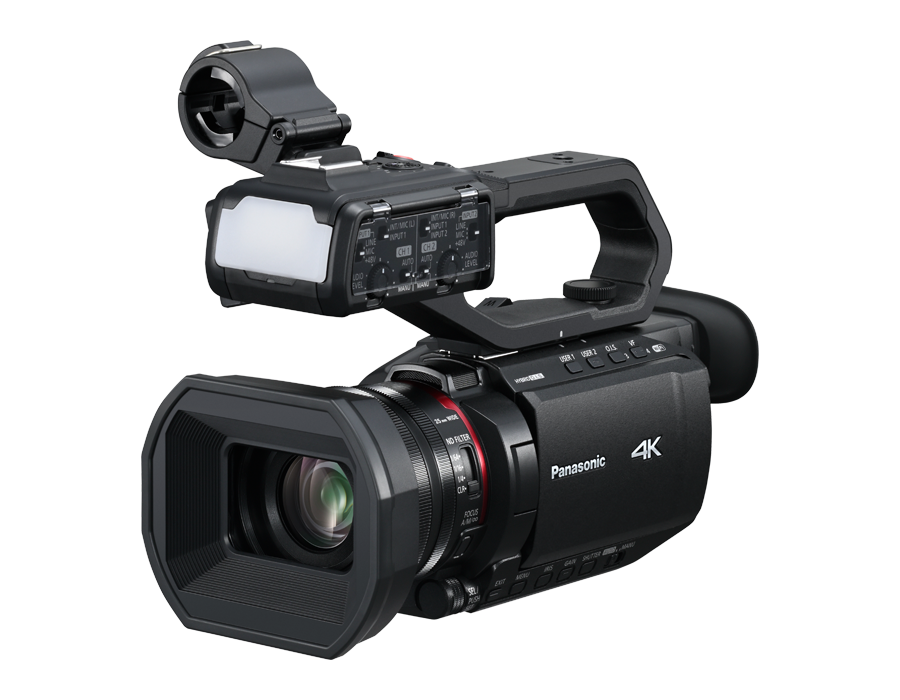
The Panasonic AG-CX20 is a compact 4K camcorder with a 24x zoom lens, two XLR audio inputs on its handle, built-in Wi-Fi streaming and two memory card slots. This guide shows how it fits three real jobs in Oman: recording and streaming the Friday khutbah and prayer, running a workshop or conference that goes online, and filming sports. Every number comes from Panasonic's own pages, and the limits are listed too.
Short answer: The Panasonic AG-CX20 (model AG-CX20EN, 769.900 OMR including VAT at Skyorbits) is a compact 4K camcorder that suits three jobs. For Friday prayer, its 24x optical zoom (25-600 mm equivalent) lets you film from the back of the hall, the supplied handle takes the mosque mixer's feed on two XLR inputs, and the two SD card slots can record the same video twice as a backup. For workshops and online events, it streams Full HD over Wi-Fi, sends NDI HX2 video to a production switcher, and outputs 3G-SDI and HDMI to a switcher or a hall screen. For sports, it adds 5-axis hybrid stabilisation, face detection and tracking autofocus, built-in ND filters and Full HD slow motion at 120 or 100 fps. Panasonic's guideline is about 4 h 35 min of continuous recording on one battery. Streaming is Full HD, not 4K.
Last updated: 25 October 2026 · Prices include VAT · Specs from Panasonic's official pages
The AG-CX20 in numbers
| Feature | Panasonic's figure | Helps with |
|---|---|---|
| Zoom lens | 24x optical, 25-600 mm equivalent, F1.8-F4.0 | Back-of-hall and sideline shots |
| Stabilisation | 5-axis hybrid | Handheld and shoulder shooting |
| Audio inputs | 2 XLR (LINE / MIC / +48V) on the supplied handle | Mosque mixer, PA desk |
| Memory cards | 2 slots, SDHC/SDXC up to 512 GB each | Backup copy, long matches |
| Battery | About 4 h 35 min (59.94 Hz) or 4 h 50 min (50 Hz), Panasonic's guideline | A full khutbah and prayer |
| Relay recording | Up to 10 hours continuous | Long events and matches |
| Live streaming | Full HD (1920 × 1080), up to 24 Mbps | Online events |
| Video outputs | 3G-SDI up to 1080p, HDMI up to 4K | Switcher or hall screen |
| Slow motion | Full HD, 120 fps (59.94 Hz) or 100 fps (50 Hz) | Sports replays |
| ND filters | 1/4, 1/16, 1/64 | Bright outdoor sun |
| Weight | About 0.85 kg body, about 1.5 kg with handle, hood, battery and eye cup | Carrying and handheld work |
How can the Panasonic AG-CX20 record and live-stream Friday prayer?
Friday prayer is a long, quiet occasion, and the sound matters most. The AG-CX20 gives you a long lens, a proper audio input and a backup recording, which are the three things that count in a mosque recording. First agree the camera position, the audio feed and the framing with the mosque's administration; this guide covers the camera only.
- Zoom from the back of the hall: the 24x optical zoom runs from 25 mm wide to 600 mm (35 mm equivalent), so the camera can stay further back than a standard lens would allow.
- Clean audio from the mosque's mixer: the supplied handle has two XLR inputs, each switchable between LINE, MIC and MIC +48V. Feed the mixer's output into an XLR input and monitor with headphones on the 3.5 mm jack. Recording is two channels.
- Long recording: Panasonic's guideline figure for the included AG-VBR59 battery is about 4 h 35 min at 59.94 Hz or 4 h 50 min at 50 Hz, with the LCD monitor on and nothing connected to the external terminals; it varies with operating conditions. For long sessions the camera also runs from USB-C PD power (9 V/3 A).
- Two-card backup: simultaneous recording writes the same video to both SD cards, and if one card fails the other keeps recording. Recording stops if either card fills, so use two cards of the same capacity; Panasonic also recommends the same speed class.
- Full HD live streaming over Wi-Fi: the camera streams to YouTube or Facebook with RTMP(S), and RTSP serves a device on your network. Connection is over its built-in Wi-Fi, USB tethering or a USB-LAN adapter (not included). Panasonic's User's Guide says you can record while outputting FHD streaming.
Friday prayer setup list
- Agree with the mosque's administration where the camera stands, what is in the frame and how the audio is taken. Choose a frame that respects the worshippers' privacy.
- Put the camera on a tripod at the back, or at the spot the administration agrees, and frame with the zoom.
- Connect the mixer's output to XLR INPUT 1 (and INPUT 2 for a second feed). Set the switch to LINE for a line-level output or MIC for a microphone, and turn +48V on only for a microphone that needs it.
- Insert two cards of the same speed class and capacity and switch on simultaneous recording.
- Start with a charged battery, or power the camera over USB-C PD for a long session.
- To go live, join Wi-Fi (or use USB tethering), enter the stream destination from YouTube or Facebook and choose a Full HD streaming format.
- Rehearse once before the first live Friday with the exact mix you will use (live stream plus two-card recording), because Panasonic's FAQ lists recording modes that cannot run together.
How can organisers stream and record a workshop, conference or online event?
An online workshop needs a clear picture, clean room sound and a reliable feed to the audience. The AG-CX20 lets you choose between a direct stream from the camera and a switcher workflow.
- Direct Full HD stream: over Wi-Fi to YouTube or Facebook with no computer in between. Streaming runs at up to 1920 × 1080 and up to 24 Mbps.
- NDI HX2 to a production switcher: Panasonic's FAQ says NDI HX2 comes as standard. It puts the video on your network for NDI-compatible switchers and media servers. Over a wired LAN it needs a USB-LAN adapter (not included); NDI over Wi-Fi needs Panasonic's free firmware 1.11. The camera does not record while NDI is on.
- 3G-SDI and HDMI to a switcher or a hall screen: 3G-SDI outputs up to 1080p and HDMI up to 4K (3840 × 2160). Both can run at once, for example UHD from HDMI and Full HD from SDI, so one can go to the switcher and the other to the screen.
- XLR from the PA desk: two XLR inputs on the handle (LINE, MIC or MIC +48V), plus a 3.5 mm headphone jack to monitor.
- Phone control: the free HC ROP app for iOS and Android controls zoom, focus, REC start and stop and menu settings. It can switch between up to 8 cameras, one at a time.
- Two-card backup: simultaneous recording writes to both cards and stops if either card fills, but it cannot run while NDI HX2 is on, so for NDI events record the programme in your switcher.
Online event setup list
- Choose the route: a direct stream from the camera, or video into your switcher (SDI, HDMI or NDI HX2).
- Take the room audio from the PA desk into XLR INPUT 1, set the switch to LINE and monitor on headphones.
- For a direct stream, join Wi-Fi, choose a Full HD streaming format and enter the YouTube or Facebook destination.
- For a switcher, connect SDI or HDMI, or put the camera and the switcher on the same wired network for NDI HX2.
- Pair the HC ROP app on the same network, so one person can run zoom and focus from the back of the room.
- For all-day events use USB-C PD power and keep the battery in as a backup; Panasonic says the adaptor takes priority when both are connected.
- Run a full test with your switcher and streaming platform before the day.
Is the Panasonic AG-CX20 good for filming sports events?
Sports needs reach, steady footage and fast handling. The AG-CX20 puts a long zoom and stabilisation in a body of about 0.85 kg, or about 1.5 kg with the handle, lens hood, battery and eye cup.
- Reach: 24x optical zoom, 25-600 mm equivalent, F1.8-F4.0. i.Zoom extends to about 48x in Full HD and 32x in UHD with minimal image degradation.
- Steady shots: 5-axis hybrid stabilisation helps on handheld and shoulder shots.
- Face detection and tracking AF: the autofocus follows faces, which suits coaches, referees and players near the sideline. Panasonic's FAQ warns that autofocus can struggle with fast-moving objects and suggests manual focus there; the camera has dual manual rings.
- Slow motion: Full HD at 120 fps (59.94 Hz) or 100 fps (50 Hz). While super slow is on, relay and simultaneous recording are switched off.
- Built-in ND filters: 1/4, 1/16 and 1/64 cut the light in bright sun, so outdoors you can keep a slower shutter speed or a wider aperture.
- Relay recording for long matches: when one card fills, recording continues on the other, and you can swap a full card during recording. Panasonic's limit is 10 hours of continuous relay recording; after that it stops and resumes a few seconds later.
- Live coverage: stream the match in Full HD to YouTube or Facebook.
Sports shoot setup list
- Pick a spot with a clear line of sight on the sideline or in the stands. Use a tripod, or shoot handheld with the stabiliser on.
- Choose 59.94 Hz or 50.00 Hz in the system menu before you start. Slow motion is 120 fps at 59.94 Hz and 100 fps at 50 Hz.
- In bright sun, switch on an ND filter: 1/4 first, then 1/16 or 1/64 as the light needs.
- Keep face detection on for people close to the camera, and switch to manual focus for fast action.
- For a long match use relay recording with two cards, and swap the full card while the other records.
- Plug a microphone or the commentary feed into the XLR inputs on the handle.
- Panasonic rates the camera for 0 to 40 °C, so keep it in the shade between plays at summer outdoor events.
What are the limits of the Panasonic AG-CX20?
Know these before you plan your event. They come from Panasonic's own manual, FAQ and specification page.
- Streaming and NDI are Full HD or lower, not 4K. Panasonic lists streaming up to 1920 × 1080.
- No recording while NDI HX2 is on. Panasonic's FAQ is explicit about this.
- SRT, and NDI over Wi-Fi, need firmware 1.11, a free update from Panasonic's support site. Check the firmware version in the menu.
- Not included: a USB-LAN adapter, an AC adaptor and memory cards. One AG-VBR59 battery is included.
- Some recording modes exclude each other: relay, simultaneous and background recording cannot run together, super slow motion switches the others off, and background recording is not available in UHD.
- Two audio channels only, whatever the recording format.
- A small sensor: 1/2.5-type MOS. Panasonic gives a minimum illuminance of 1.5 lx (F1.8, Super Gain+, 1/30 s), so test the camera in the light of your own hall.
- Operating range 0 to 40 °C, and no external timecode input, which matters if you sync several cameras.
What does Panasonic say about it?
“It supports extended 4K/60p recording, making it ideal for long-duration shoots.” — Panasonic, AG-CX20 product page (read 25 October 2026)
“This allows you to stream to many services, such as Facebook and YouTube, making it perfect for live coverage of concerts, sports events, and breaking news.” — Panasonic, AG-CX20/CX18 User's Guide, V1.01E (June 2026)
How much is the Panasonic AG-CX20 in Oman, and how do I order it?
The Panasonic AG-CX20 (AG-CX20EN) is 769.900 OMR including VAT. Order on skyorbits.tech or in the Skyorbits app. It has a 1-year manufacturer warranty and we submit the warranty claim for you. Memory cards are bought separately.
Have a question first? Message us on WhatsApp or send a DM, and one of our team will reply.
For mosques, schools, companies and event organisers
We prepare official quotations on our letterhead, VAT included. Send the organisation's name, the contact person and the items and quantities on WhatsApp or to [email protected], and one of our team will reply during working hours.
Frequently asked questions
What is a good camera to record and live-stream Friday prayer?
The Panasonic AG-CX20 is built for it: a 24x optical zoom (25-600 mm equivalent) to film from the back of the hall, two XLR audio inputs on the supplied handle for the mosque's mixer, simultaneous recording to two SD cards as a backup, and Full HD live streaming over Wi-Fi. Agree the camera position, the audio feed and the framing with the mosque's administration first.
Can the AG-CX20 take audio from a mosque or PA mixer?
Yes. The supplied handle has two 3-pin XLR inputs, each switchable between LINE, MIC and MIC +48V. The LINE level is +4 dBu or 0 dBu, chosen in the menu. Recording is two channels, and a 3.5 mm headphone jack lets you monitor the sound.
How long does the AG-CX20 battery last?
Panasonic's guideline figure for one AG-VBR59 battery is about 4 h 35 min at 59.94 Hz or 4 h 50 min at 50 Hz, with the LCD monitor on and nothing connected to the external terminals; it varies with operating conditions. For longer sessions the camera accepts USB-C PD power (9 V/3 A), and relay recording carries on across the two cards for up to 10 hours of continuous recording.
Can the Panasonic AG-CX20 live-stream without a computer?
Yes, in Full HD or lower, not 4K: RTMP(S) to YouTube or Facebook (RTSP serves a device on your network), over the built-in Wi-Fi, USB tethering, or a wired LAN through a USB-LAN adapter (not included). Panasonic lists the removal of RTP/RTSP/RTMP/NDI only for its European models (AG-CX20EJ, AG-CX18EJ, AG-CX18EH). Our unit is the AG-CX20EN, which is not on that list. SRT needs Panasonic's free firmware 1.11.
Does the AG-CX20 work with NDI and a production switcher?
Yes. Panasonic's FAQ says NDI HX2 comes as standard. It works over a wired LAN with a USB-LAN adapter (not included), or over Wi-Fi with free firmware 1.11. The camera cannot record while NDI is on, and NDI is Full HD or lower. The 3G-SDI and HDMI outputs are the other ways into a switcher.
Is the Panasonic AG-CX20 good for sports?
It suits many sports shoots: 24x optical zoom (25-600 mm equivalent), 5-axis hybrid stabilisation, face detection and tracking autofocus, built-in ND filters for bright sun, Full HD slow motion at 120 or 100 fps and relay recording for long matches. Panasonic notes that autofocus can struggle with fast-moving objects, so switch to manual focus for those. Its rated operating range is 0 to 40 °C.
Can I use the AG-CX20 as a webcam for Zoom or Teams?
Panasonic does not list webcam use. Its USB-C port works as a storage device (read-out only) or as a host for USB tethering and a USB-LAN adapter. For Zoom or Teams, send the HDMI or SDI output into a capture device or a switcher that your computer sees as a camera.
How much is the Panasonic AG-CX20 in Oman?
769.900 OMR including VAT at Skyorbits for the AG-CX20EN. Memory cards are bought separately, and Panasonic says its accessories differ by country, so ask us to confirm the box contents. The camera has a 1-year manufacturer warranty and we submit the warranty claim for you. Order on skyorbits.tech or in the Skyorbits app.
Can mosques, schools and companies get an official quotation?
Yes. We prepare official quotations on our letterhead, VAT included. Send the organisation's name, the contact person and the items and quantities on WhatsApp or to [email protected], and one of our team will reply during working hours.