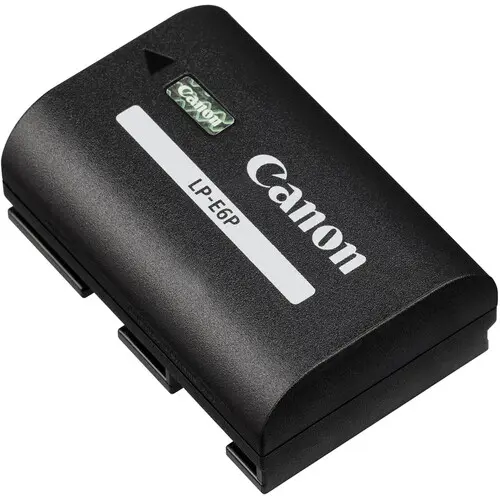
New battery, same camera — but some Canon bodies need a quick firmware update before a battery like the Canon LP-E6P unlocks its full speed and in-camera charging. It takes about 10 minutes, needs no tools, and you only do it once. Here's exactly how.
Do You Actually Need This?
EOS R5
Needs firmware v2.1.0 or later for full LP-E6P support.
EOS R6 Mark II
Needs firmware v1.5.0 or later for full speed + in-camera charging.
EOS R6 (original)
Works with the LP-E6P out of the box — no update needed.
EOS R7
Works with the LP-E6P out of the box — no update needed.
Updating Your Firmware — Step by Step
Check your current version
On your camera, go to the wrench (settings) menu and find "Firmware Version." Note the number shown.
Download the update from Canon's official site
Go to Canon's official support page for your exact camera model, find the Firmware tab, and download the latest version listed there for your camera and operating system.
Copy it to a memory card
Unzip the download, copy the firmware file to a freshly-formatted memory card, then insert that card into your camera.
Run the update from the camera menu
With a full or near-full battery, go to the wrench menu, select "Firmware Update," and follow the on-screen steps. Don't turn the camera off or remove the card until it finishes.
Confirm it worked
Check "Firmware Version" again in the same menu — it should now show the new number. Your camera is ready for the LP-E6P's full performance.
Frequently Asked Questions
Will my camera still work with the LP-E6P if I skip the update?
Yes — the battery will still power the camera. You'll just miss out on the fastest burst speed and in-camera USB charging until you update.
Is the firmware update free?
Yes, firmware updates are free and official, direct from Canon.
What if the update fails partway through?
Don't panic — don't remove the battery or card. Most cameras have a recovery mode; check Canon's official support page for your model, or bring it to our Muscat showroom and we'll help.
Need the battery or a hand with the update?
Message us on WhatsApp — we sell the genuine Canon LP-E6P and can walk you through the update at our Muscat showroom.
Ask us on WhatsAppFirmware version numbers reflect official Canon information as of July 2026 — always confirm the latest version on Canon's official support site for your exact camera model.
بطارية جديدة، نفس الكاميرا — بس بعض كاميرات Canon تحتاج تحديث فيرموير سريع قبل لا بطارية زي Canon LP-E6P تشتغل بأقصى سرعتها وتقدر تتشحن من داخل الكاميرا. الموضوع يأخذ عشر دقايق تقريبًا، ما يحتاج أدوات، وتسويه مرة وحدة بس. هذي الطريقة بالضبط.
هل تحتاج هذا فعلًا؟
EOS R5
يحتاج فيرموير نسخة 2.1.0 فأعلى عشان يدعم LP-E6P بالكامل.
EOS R6 Mark II
يحتاج فيرموير نسخة 1.5.0 فأعلى عشان أقصى سرعة + الشحن من داخل الكاميرا.
EOS R6 (الأصلية)
تشتغل مع LP-E6P بدون أي تحديث.
EOS R7
تشتغل مع LP-E6P بدون أي تحديث.
تحديث الفيرموير — خطوة بخطوة
تأكد من النسخة الحالية
روح لقائمة الإعدادات (أيقونة المفتاح) بالكاميرا ودوّر على "نسخة الفيرموير"، ولاحظ الرقم المكتوب.
حمّل التحديث من موقع كانون الرسمي
روح لصفحة الدعم الرسمية لموديل كاميرتك بالضبط، ودوّر على تبويب الفيرموير، وحمّل آخر نسخة مذكورة لكاميرتك ونظام تشغيل جهازك.
انسخه على بطاقة ذاكرة
فك ضغط الملف اللي حملته، انسخ ملف الفيرموير على بطاقة ذاكرة مهيّأة حديثًا، وحط البطاقة بالكاميرا.
شغّل التحديث من قائمة الكاميرا
تأكد إن البطارية شبه ممتلئة، روح لقائمة الإعدادات، اختر "تحديث الفيرموير"، واتبع الخطوات اللي تطلع على الشاشة. لا تطفي الكاميرا ولا تطلع البطاقة لين يخلص التحديث.
تأكد إن التحديث نجح
ارجع لنفس القائمة وشيك على "نسخة الفيرموير" — لازم يطلع الرقم الجديد. كاميرتك جاهزة الحين تستفيد من أداء LP-E6P بالكامل.
الأسئلة الشائعة
إذا ما سويت التحديث، بتشتغل الكاميرا مع LP-E6P؟
أيوه — البطارية بتشغّل الكاميرا عادي. بس بتفوتك أقصى سرعة تصوير متتابع والشحن من داخل الكاميرا لين تحدّث.
التحديث مجاني؟
أيوه، تحديثات الفيرموير مجانية ورسمية مباشرة من Canon.
ويش أسوي إذا توقف التحديث بالنص؟
لا تستعجل — لا تطلع البطارية ولا البطاقة. أغلب الكاميرات فيها وضع استرجاع؛ شيك صفحة الدعم الرسمية لموديلك، أو جيب الكاميرا لمعرضنا بمسقط ونساعدك.
تحتاج البطارية أو مساعدة بالتحديث؟
راسلنا واتساب — نبيع Canon LP-E6P الأصلية ونقدر نساعدك بالتحديث بمعرضنا بمسقط.
تواصل معنا واتسابأرقام نسخ الفيرموير تعكس معلومات كانون الرسمية بتاريخ يوليو 2026 — دايمًا تأكد من آخر نسخة على صفحة الدعم الرسمية لموديل كاميرتك بالضبط.